
Voice invoicing for the trades
Say the job. Send the invoice.
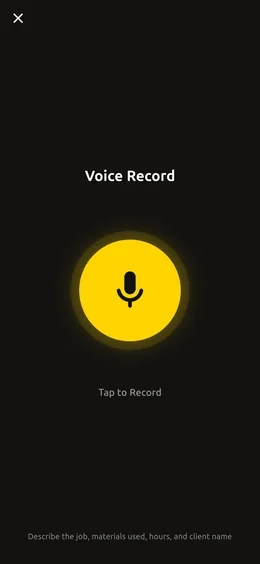
Tap record in the truck and talk. AI drafts the line items, materials, client and follow-ups. You check it, send the PDF and mark it paid when the money lands.
Free to download, with 5 voice logs to try on real jobs. For iPhone, iPad and Android.
Built for
How it works
Watch one job become one invoice.
A water heater swap, start to paid. Tap a step to stop and look around.
What you say
One take, in your own words. No forms and no typing.
What AI pulled out
for Sarah Lopez at 88 Oak Street
Client: Sarah Lopezeleven-fifty for the heater
Material, $1,150.00three hours labor
Labor, 3 × your hourly rateseventy-five to haul away the old unit
Other, $75.00call her Friday to check the pilot
Follow-up task, due Friday
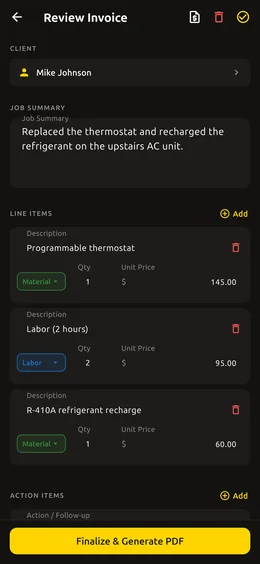
Every line is editable. Nothing goes out until you approve it.
What your customer gets
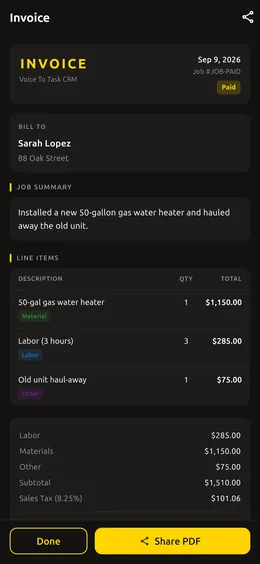
- 50-gal gas water heater$1,150.00
- Labor (3 hours)$285.00
- Old unit haul-away$75.00
A clean PDF, sent by text or email before you leave the driveway.
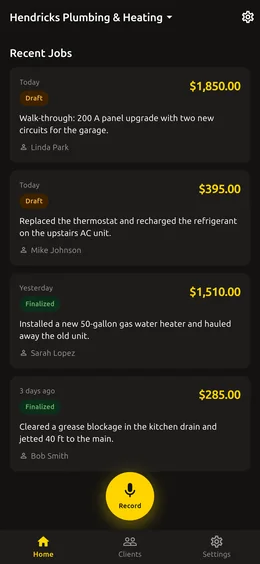
Who has paid, who hasn't
- Sarah LopezWater heater installPaid
- Bob SmithKitchen drain, jetted to the mainOutstanding
- Mike JohnsonThermostat and refrigerantDraft
Tap Mark paid when the money lands. Tapped too soon? Undo.
Estimates and invoices
Quote it on the walk-through. Bill it when you're done.
Walk the job, speak the scope and send a PDF estimate before you pick up a tool. When the work is finished, finalize the same draft into the invoice without retyping a line.
- Every estimate is marked as an estimate, not an invoice
- PDFs print in your language and your region's currency
- Send by text or email from your phone's share sheet
Still typing? Use the free invoice and estimate templates for plumbing, HVAC, electrical, handyman, landscaping and roofing work. They total and tax the lines and make the PDF in your browser.
After the invoice goes out
Get paid. Know who hasn't.
Paid or Outstanding
Every finished invoice shows where it stands, with one-tap Mark paid and Undo.
Your tax, line by line
Add your VAT, GST or sales tax rate and choose which lines are taxable.
Your rate fills itself in
Set your hourly labor rate once. It prices the labor whenever you don't say a number.
A client list that builds itself
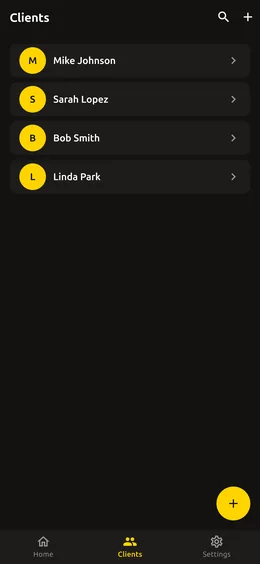
Clients and job history grow from what you say. Change the client on any draft.
Follow-ups with due dates
“Call them back Tuesday” becomes a task on the job, with Tuesday as its due date.
Your crew, with roles
Invite your team as owner, technician or read-only accountant.
Finish the job. Say what you did. Send the bill.
Handymen and contractors
Bill mixed labor and materials without touching a keyboard.
Contractor invoicesInside the app
The screens you will use every day.
For your accountant
Your bookkeeper gets a login, not your phone.
Invite your accountant with a read-only role. They open your invoices in a browser, download the PDFs and export everything to CSV. They can look, and they can't change a thing.
Straight talk about the AI
You approve every line.
Your recording goes to Google's Gemini AI, which transcribes it and drafts the estimate or invoice.
The app asks for your consent before your first recording.
Your data is never sold and is not used to train AI models.
AI can make mistakes, so look over each draft before you send it.
Pricing
Try it on real jobs first.
FREE
5 voice logs
Check the accuracy on your own jobs before you pay for anything.
- Estimate and invoice PDFs
- Clients and job history
- Tax and hourly rate
- Team roles
- Paid and Outstanding
- Accountant web access
PRO
Unlimited voice logs
No caps. Record every job, every day. Monthly or yearly, and the yearly plan includes a free trial.
Everything in Free is included. You subscribe inside the app, where the App Store or Google Play shows the price in your own currency. Cancel any time in your store account settings.
Do I have to type anything?
No. You talk and AI drafts the job. You only touch the keyboard if you want to fix a line.
What if it mishears me?
Every line on the draft is editable: the description, the type, the quantity, the price and whether it is taxable. Nothing reaches a customer until you finalize it.
Can I send an estimate before the job?
Yes. Share any draft as an estimate PDF. It is marked as an estimate, not an invoice. When the work is done, finalize the same draft into the invoice.
Where do I get the app?
On the App Store for iPhone and iPad and on Google Play for Android. Create your account here or in the app, then sign in on your phone.
Can I try it without making an account?
Yes. In the app, choose Continue as Guest and try it on a real job. Add an email later and your jobs, clients and subscription carry over.
What happens to my recording?
It goes to Google's Gemini AI, which transcribes it and drafts the estimate or invoice. The app asks for your consent before your first recording. Your data is never sold and is not used to train AI models.
Does it work without a signal?
No. Recording and processing need a connection, so record once you have signal.
Which languages does it come in?
English, German, Spanish, French, Italian, Japanese, Dutch, Polish and Brazilian Portuguese, for the app and for the PDFs. Amounts print in your phone's regional currency.
How much does it cost?
The app is free to download with 5 voice logs. Pro unlocks unlimited voice logs, monthly or yearly, and the yearly plan includes a free trial. The App Store or Google Play shows the price in your own currency.
How do I cancel Pro?
In your Apple Account or Google Play subscription settings. Subscriptions renew automatically unless you cancel at least 24 hours before the current period ends.
Stop doing paperwork at night.
Create your account here, then get the app and sign in with the same email. Your first 5 voice logs are on us.
Your account is ready
Check your email
Get the app and sign in with and the password you just chose. Your first 5 voice logs are on us.
If is new to us, we sent it a confirmation link. Click it, then get the app and sign in with the same email and password.